Safety measures for Meta Business
Protect your Meta Business Portfolio by making sure your accounts are properly secured. Because you manage this environment yourselves, it is extremely important that you protect this access and data as effectively as possible.
Your Meta Business Portfolio / Business Manager is the central place where all business assets are gathered: your Facebook and/or Instagram account, advert-management, and payment information.
By configuring important settings correctly and checking them regularly, you ensure that you are less vulnerable to hacks and that the continuity of your marketing remains guaranteed.
Security of personal accounts
Access to the business portfolio always goes via your personal Facebook profile. The security of your own profile is therefore an important first step.
Strong password: Use a strong and unique password for Facebook. Don’t forget to do the same for the email address linked to your personal Facebook account.
Two-factor authentication (2FA): Enable this everywhere. This means that when logging in, you must enter a code that you receive via an app (such as Google Authenticator) or SMS. Again, don’t forget to do the same for the email address linked to your Facebook account.
2FA really is the best protection for your accounts. Please set this up wherever you can!
Settings for the team
Within the business settings of the Meta business portfolio, you can set a number of rules that apply to everyone in your business portfolio.
Require 2FA: You can indicate via the settings that everyone with access is required to use two-factor authentication. This is strongly recommended.
Multiple colleagues with administrator access: Ensure there are always at least 2 and at most 3 administrators. This prevents no-one being able to access the settings anymore if a colleague leaves the company or if an account is (temporarily) blocked.
Other colleagues with access: Add relevant colleagues as 'employee'. They can do their work, but do not have the rights to make major changes to the portfolio.
Clean up: Remove former employees or partners who no longer work for you from the system on a monthly basis.
Monthly check in the Security center
Go to Meta’s Security center and take a minute to check the following every month:
Inactive employees: Revoke access for people who have not used the account for a long time.
Trusted email domains: If feasible, limit the access to people with an email address associated with a business (e.g. @yourcompany.co.uk). This is strongly recommended.
Recognize phishing
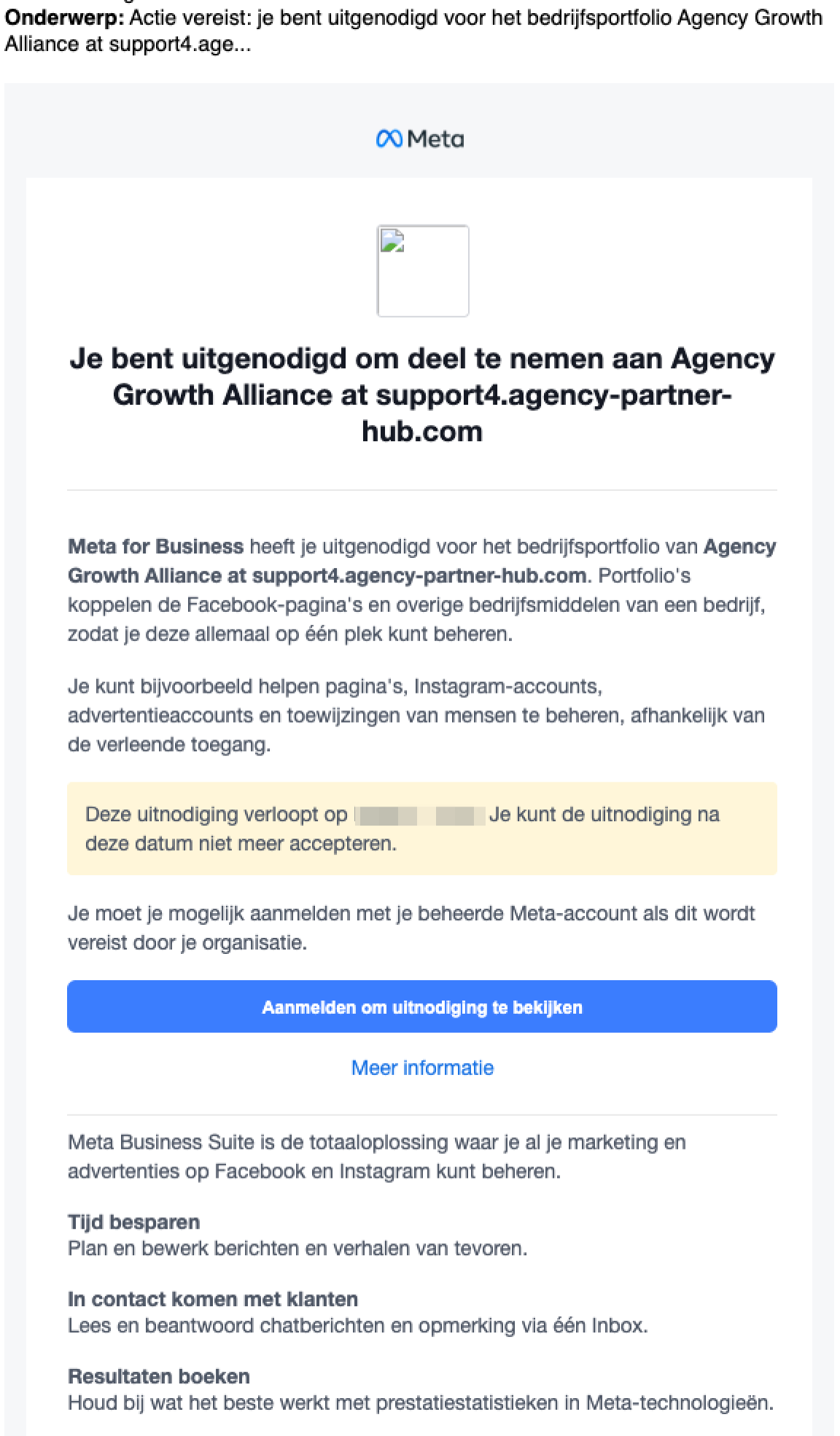
Fake messages that appear to come from Meta are being sent more and more frequently.
Check the sender: the only domains that Meta actually uses to send emails are fb.com, facebook.com, facebookmail.com, instagram.com, meta.com, metamail.com, support.facebook.com, business.fb.com.
Think before you click: Have you received a threat that your account will be deleted immediately? Do not click the link in the email, but log in via business.facebook.com.
If there is actually something wrong, you will see an official notification about it in your dashboard.Partners: Never just add a 'partner' to the business portfolio, especially if you receive an email with pressuring language like 'invitation lapses within 48 hours' or 'action required'. Always communicate directly with the company in question and verify the business ID.
Together for a secure environment
Careful management of the business portfolio is essential for the continuity of your advertisements and page management. We therefore advise you to check the above points periodically, so that access to the organization always remains well protected.
Contact support@bookingboosters.com if you need help or advice concerning these safety measures. We are happy to take a look with you to ensure that everything is set up correctly.